
기억보다 기록을
recipe 사용하기 본문
내가 원하는 타입의 데이터를, 그림을 그리는 함수 (bar, plot 등등)에 넣었을 때
그림이 나오도록 해야하는 상황에서는 @recipe 매크로를 사용하면 편리하다.
예를 들어서, 특정 분포를 plot의 입력값으로 넣었을 때 그 분포에 대한 pdf 그림을 그리고 싶다고 하자.
using Plots, Distributions

pyplot(size=(400,250));

function default_range(dist::Distribution, n = 4)
    μ, σ = mean(dist), std(dist)
    return range(μ - n*σ, stop=μ + n*σ, length=100)
end

dist = Normal(10,50)
기본적으로 plot 함수에 분포가 들어오면 다음과 같이 에러를 내보낸다.
julia> dist = Normal(10, 50)
Normal{Float64}(μ=10.0, σ=50.0)

julia> plot(dist)
ERROR: Cannot convert Normal{Float64} to series data for plotting
Stacktrace:
.......
기능 구현을 위해 아래와 같이 @recipe 매크로를 사용한다.
@recipe function f(dist::Distribution, x = default_range(dist))

    # pdf 계산
    y = map(xi -> pdf(dist,xi), x)

    # 커스터마이징 (선 색깔, 범례 등)
    linecolor   --> :red
    legend --> false

    #그리고자 하는 그림의 형태. :path의 경우 그림 형태를 자동으로 선정
    seriestype --> :path

    return x, y
end
plot(dist)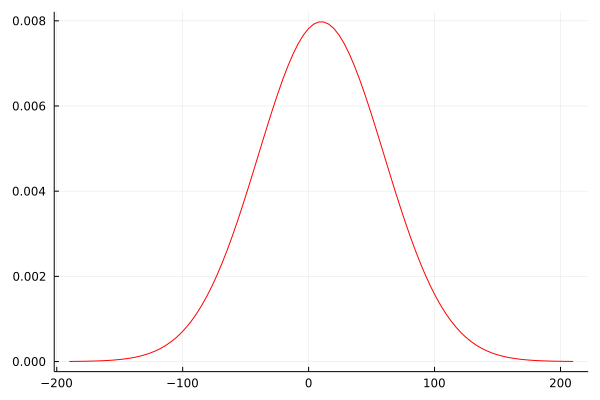
plot 외의 다른 함수에도 물론 적용이 가능하다.
bar(dist)
물론 기존의 plot 함수에서 쓰이는 옵션들을 추후에 추가할 수도 있다.
plot(dist, linewidth=5, ylabel='density')
요렇게
참고 문헌
https://docs.juliaplots.org/latest/recipes/
Recipes · Plots
Recipes are a way of defining visualizations in your own packages and code, without having to depend on Plots. The functionality relies on RecipesBase, a super lightweight but powerful package which allows users to create advanced plotting logic without Pl
docs.juliaplots.org
'Julia' 카테고리의 다른 글
| Julia - sizehint! (0) | 2022.02.13 |
|---|---|
| Julia에서 행렬을 1차원 배열로 만들기 (0) | 2022.02.13 |
| Julia - conditional operators (0) | 2022.02.11 |
| Julia - function 입력값 다루기 (0) | 2022.02.09 |
| Julia - VectorOfArray 사용하기 (배열의 배열을 1차원 배열로 변환) (0) | 2021.12.04 |
'Julia' Related Articles
more
